Comparing Splunk and Splunk Storm with Sumo Logic

March 5, 2013 Leave a comment

One of the Splunk dashboards I made for my current siteThe company I’m working for is looking to move some of its server equipment to Amazon Web Services (AWS) type infrastructure, and in doing so, is also re-looking at products used to ingest and search enterprise log data.   Seeing that log file analysis has long been my favorite product category of any of the enterprise software I run (chalk that up to my days long ago as a support engineer for Webtrends), I’m of course interested in the differences between Splunk (as the preeminent do-it-yourself solution) and other newer products like Splunk’s own Splunk Storm hosted solution, and up-and-coming competition like Sumo Logic

Following are a few points that I can think of, from my own usage of the product, that compares the three.  Note that the Splunk install I have is a relatively small one – 40GB/Day data ingestion rate, so the problems I have and features I like are going to be a lot different than ones of a big site.

  Splunk (Self Hosted) Splunk Storm Sumo Logic
Auto Source Typing Knows the source typing of your data, automatically parses it and extracts fields.   Nearly every log file type except the really obscure ones (like CQ5 dual-line request logs) are automatically parsed & fields extracted by Splunk.  Same as self-hosted Splunk. Can’t parse data by itself, makes you tell it how to parse the data before it can extract any fields.  The Sumologic demo guy we had said this is coming later as a feature at some point.
Interactive field extraction Easy as heck to extract fields from unknown log types using the interactive field extractor tool.  Makes it dead easy to do more complicated lookups & averages on new log types.  Same as self-hosted Splunk Couldn’t figure out how to do this with Sumo.
Scripted Input from  Unix Boxes This is (in my opinion) one of the biggest selling features of Splunk.  Splunk’s *NIX app includes, out of the box, nifty scripted input that grabs the output of top, ps, netstat, df, etc and dumps that into a parsable, graphable index that you can use to make nifty CPU and network graphs for dashboards, search to see when a particular process was actually running on a machine, etc.  Splunk Storm presently does NOT allow you to run apps, which is far and away the biggest reason it’s still sort of a toy compared to the self-host product. You’d have to do this yourself in Sumo Logic, which is a LOT of work. 
App ecosystem Self-host Splunk gives you access to all of the nifty apps folks have made for parsing F5 data, Nagios data, S3 buckets, etc, etc.  Splunk Storm doesn’t let you do apps.  Sad smile They’re working on an app infrastructure, but this is nowhere compared to the 5-year head start Splunk has.
Graphing Splunk has sexy graphing libraries that let you make radial gages, marker gages, area graphs, scatter graphs, all sorts of sexy ways to visualize data.  Same as self-host Splunk. Bar graphs, line graphs, that’s about it.  Pretty bare-bones, though the dashboarding is pretty easy to accomplish.
Integration with On-Premise Data Single web search head can query multiple indexers, including things on F5’s, CCTV prod, etc, etc.  A search head at amazon could transparently include on-site data. You can’t really do this with Storm. Can’t do this with Sumo.
Data Retention You can retain as much as you have storage for.  You pay for data retention You pay for data retention


There’s more, but this is just what I could think of off the top of my head.

I’m really curious to know what folks think of Sumo Logic, especially for those who’ve used Splunk in production as well. 

Flickr: PLEASE Improve your Video Compression Codec!

December 20, 2012 Leave a comment

Ever since Flickr rolled out the feature to upload videos as well as photos, Flickr has been the first place I put up videos. Why? Most videos I take are part of the same stream as my photos – part of a set of vacation shots, or are usual daily uploads like this one – and I love being able to view them in the same context as the rest of my photos – instead of telling people to go to YouTube if they want to see video.

But, at this point, the video codec that Flickr is using is a straight-up embarrassment and due to the distractingly-bad compression artifacts, is so utterly contrary to the whole reason Flickr stated that they rolled out video to begin with.

See the above video. Now, granted, it is basically a worst-case scenario for a video compression codec, as with the leaves and trees and movement, you basically have 95% of the pixels of the frame changing from frame to frame. But still, the video quality is so bad that it’s painful to watch. It’s like it was compressed with Sorenson Spark, circa 2005, and made to be streamed to a first-generation color-screen cell phone.

I’m no stranger to the compute requirements of implementing a proper codec, the storage requirements of such, and the banks of new equipment that will probably have to be added in order to make it a reality.

But it’s the price to play in today’s market – and encoding on YouTube looks a million times better, even if it still has some distracting blurring.

Photo quality is most of the reason why I still have all of my photos here on Flickr. But with the fact that Picasa/G+ encodes all its video on Youtube, it basically starts tipping the scales away from my favorite platform.

Can someone please help?

Categories: technology

Mercedes-Benz C250 Sedan & Coupe – Rental Car Review

November 8, 2012 Leave a comment

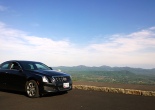
Mercedes-Benz C250 - in the Blue Ridge Mountains of Virginia

I recently rented, on separate trips, a Mercedes-Benz C250 sedan, and then later a Coupe, from my trusty friends at Enterprise Rent-a-Car.  Now, I had a ton of folks who saw the above photo I posted to Facebook say, “Wow!  Cool!  A Mercedes!”  However, I actually didn’t even find it to be superior to the Kia Optima I had rented previously, and I wanted to take some time and detail my thoughts on this car.

  • The Engine is a Joke:  In the name of efficiency, and also because BMW and Audi were doing it, Mercedes opted to replace the base 6-cylinder in the C300 with an all-new 201hp 1.9-liter, direct-injected turbo 4-cylinder.  In short, I think this engine absolutely doesn’t belong in a Mercedes.  Its character would be appropriate in maybe a Golf GTI or an old Saab, but not a new Mercedes.  My reasoning is that, whilst it does give impressive fuel economy for a mid-side sedan (I averaged 24mpg on mixed highway/city driving, and 33mpg on a 500mi stint of I-81 to Tennessee) it has some of the most non-linear power delivery I’ve seen since an old Volvo 740 turbo station wagon.  You step on the gas, and you get nothing, then a surge of power and clanky Volkswagen noises.  It makes it very difficult to modulate, like if the throttle is connected to a big rubber band.Case in point why that is out of character – in normal around-town driving in the rain, I tried to get through an intersection quickly.  Not flooring it, just goosing it enough to get through the intersection.  The car hesitated and so I gave it a bit more, and then all of the sudden, mid-corner, the boost comes on in a gear I didn’t expect, and the whole car starts power-sliding for about 8 feet to the side until the stability control kicked in.   Just not what I’d expect in a luxury sedan from Mercedes – I’d expect something a bit more refined and linear.

    I’m sure I’d have liked this engine a lot more if it had a stickshift, but connected to an automatic, it just does not feel like I’m driving a “luxury” vehicle.

  • The Ergonomics are a disaster:  There are two things I like about the C250 – the seats and the steering wheel – both of which feel lifted from an AMG machine.  The steering wheel is a flat-bottom unit that feels fantastic and just makes you want to – well – steer.  And the seats are bolstered well, but are comfortable for long cruises.Mercedes-Benz C250 gauges and interior

    The rest of the interior, though, was a poorly-thought-out mess:

  • No map lights:  In the sedan, there are no map lights.  So, when driving in the middle of the night, you need to illuminate the entire car in order to look at where you dropped your road trip snacks.   For some reason, the C250 coupe does have map lights, but they’re controlled through these microscopic buttons on the headliner that you literally almost have to stop your vehicle to locate.   It’s the little things like this that you notice on a road trip.
  • Terrible infotainment system:  The KOMMAND system for handling audio / phone / etc is a user-interface study in confusion.  It took me, who has spent years developing web user interfaces, about 30 mins to figure out how to hook up my phone via Bluetooth to the stereo, only to have it actually not work.  (I had to end up getting a 1/8” stereo jack to plug it in directly).  And while the stereo itself sounds great, good bass, good tweeters – the phone bluetooth audio connection makes telephone conversations almost useless.  Every call I made sounded worse than a McDonalds drive-through.   The infotainment system in my Honda not only is more visually pleasing, but is a snap to use even for novices and above all, actually workswith all of the bluetooth phones we have in the house.And for a car that I rented so that I could take a road trip, having the stereo and phone not work just makes me hate the whole car, if you know what I mean.
  • Gauges: The gauges are beautifully-styled but are tough to read, and the steering wheel obscures half of the tachometer.
  • Aaaaand….it broke down:  And, as fate had it, on my second C250 rental, I got a C250 coupe that evidently had an engine issue – or developed one.   I pulled into a rest stop for a break, then pulled back into the freeway – and while accelerating the check-engine light came on and, from the sounds of it, one of the cylinders stopped firing.   Naturally, I panicked a bit, as I was driving through the least-populated area of Virginia at 10:30pm, and still had another 5 hours of driving before hitting Knoxville.  Luckily I was able to reach the Enterprise location at Roanoke Airport, and was able to limp there 10 mins before they closed.  They of course switched me out to a different car with no questions asked.

But with the above, you can understand now why I have a funny look on my face when folks say, “Ohhh…Mercedes!  Nice rental, man!”  If you get this one as a choice for a road trip, I’d suggest taking something else.

Kia Optima – Rental Car Review

November 8, 2012 Leave a comment
My Optima vs. My Nemesis by tadnkat
My Optima vs. My Nemesis, a photo by tadnkat on Flickr.


Well, this is going to be another in what is likely going to be a recurring theme for this blog.  I rent cars at least once a month for a road trip from DC to Knoxville, Tennessee, for business purposes.  Being a car nut, I try to rent a different car every time – and of course, I do end up being fairly opinionated on each.

On once such recent trip, I rented a maroon Kia Optima EX.  Enterprise had originally put me into a Chevy Malibu, but as I needed bluetooth for the long trip (so I can do conference calls & such) and the included OnStar wasn’t going to cut it.

The Optima is actually an incredibly capable sedan, and I came away impressed.

Summary In a Sentence:

I would own this car in a heartbeat if it came with a 6-speed manual.

Brief driving notes:

Powertrain & Handling:

The Optima has a 2.4 liter twincam 4-cylinder making 200hp to the front wheels through a decent 6-speed automatic.  While it’s got these big dual-exhausts and such, the engine sort of makes a tinny sound but still is plenty gutsy especially for a base engine.    I did wish for a bit more passing power when on two-lane roads, but in the main, it’s a great little engine.   My main beef?  Lack of a manual transmission.  As it doesn’t have much in the way of low-end torque, you have to rev it to make it seem quick, and that’s laborious and imprecise with the automatic, even in manual-shift mode.

Probably the thing which struck me first about the car was its handling.  It feels athletic when you drive it – especially when driven back to back with the Chevy Malibu.  It has a small-diameter steering wheel, and a nice & direct steering feel, and has grippy seats which I found good for cornering.

Heading home via The Dragon. 318 curves in 11 miles...this ought to be good.

Sign at the entrance to the Tail of the Dragon on Route 129.

And I DID definitely test the cornering, as on my way back from Knoxville I took the car through the infamous Dragon’s Tail on Route 129 through the Smokies.  The route has (as advertised) 318 curves in 11 miles and – let me tell you – it does not disappoint.

The Kia, while not the IDEAL vehicle for such an excursion (I’d say ideal would be more of a Subaru BRZ), also was no slouch for a family sedan.  The 215/55 tires held on well, and the manual mode on the transmission (though frustrating) worked OK in lieu of a proper gearbox.

Gas Mileage:

I got 25mpg in mixed city/highway driving, and 32.5mpg on the 500-mile trip from Knoxville to DC.   Not terrible, but also a bit below the EPA estimates.

All told, I’d definitely recommend the Kia Optima to anyone looking for a sedan more on the sporty side, and definitely a comfortable cruiser for the trip down the I-81.

Our Rental Chrysler Town & Country – Family Review

October 24, 2012 2 comments
Kat & Our Rental Ride by tadnkat
Kat & Our Rental Ride, a photo by tadnkat on Flickr.

We recently got back from a fairly epic trip to LA and Oregon — flying to LA, then taking the Amtrak Coast Starlight up to Oregon. We rented Chrysler vans in both locations – a Dodge Grand Caravan in LA, and its mechanical twin, the Chrysler Town & Country for our week in Oregon. We are recent minivan converts, having sold our beloved stickshift Subaru Outback so as to gain the sliding door and cavernous space offered by a minivan.

Now, the van we purchased for ourselves is a 2012 Honda Odyssey EX. Given that some of our friends are considering going the minivan route, I figured I’d offer my quick review comparing these Chrysler twins to our Honda.

  • Engine:  The Caravan and the Town & Country have Chrysler’s new Pentastar 3.6l V6, which at 286HP is theoretically the most powerful engine you can get in a minivan.  However, it makes all of its power in the upper end of the rev range – so, unless you really stomp on the throttle, the vehicle can feel strained around town or on the freeway.  Contrast this to the 248HP 3.5l V6 in the lighter Odyssey, which actually never feels strained, and regardless of numbers actually feels more powerful around town and in passing.
  • Fuel Economy:  I averaged 21 mpg in the Caravan in almost exclusively highway driving, and averaged 21.5 mpg in the Town & Country in about 80% highway driving.  Contrast that to the Odyssey which averaged 25mpg on a mixed city/highway trip to Connecticut, and 27.5 mpg on a recent all-highway trip.   Another salient feature is that the Odyssey has a fuel-saving, cylinder-deactivation mode (basically turning off 3 of the cylinders of the engine when you’re on part-throttle on the highway).  This feature activates automatically without any input from you.  So, as long as you’re careful on the throttle, it’ll kick in and save you gas.  Contrast this to the Chrysler twins which require you to push an “ECO” button on the dash when you want to save gas.  With the ECO mode active, it does manage to improve mileage, but at the same time makes throttle response lazy, and will also refuse to kick down gears when you’re going up a hill.   So, I’d definitely give the advantage to the Odyssey.
  • Seating Flexibility: Probably the best case for the Town & Country and the Grand Caravan are the nifty Stow & Go seats it has.  The middle-row captains chairs can fold flat & completely disappear under the floor with a few quick pulls, which came in handy when my daughter insisted on only sitting in the 3rd row of seats, yet we wanted some room for bags & such in the middle.  In the Odyssey, you can physically remove the middle seats or fold them forward, but they can’t do the nifty acrobatics of the Chryslers.
  • Seating Comfort: The actual main reason we ended up getting our Odyssey over the Chrysler vans was the comfort level of the seats.  The Odyssey has these fantastic thrones which are firm, supportive and extremely comfortable over long stretches.  Both my wife and I loathe the front seats in the Grand Caravan, and found the Town & Country’s seats better but still mooshy and not nearly as comfortable as the Odyssey.   Back seats are a similar story.
  • Ergonomics:  This is a mixed bag.  The Chrysler twins have a nice uConnect touch-screen stereo which works well enough, Bluetooth audio streamed with no fuss as well (blasting Cars and The Lion King soundtrack from our phones is essential to surviving road trips).  The HVAC system is a bit of an ergonomic disaster, being confusing to operate and sometimes giving one heat when one didn’t ask for it, etc.  But overall it’s a personal-preference thing between the Odyssey and the Chrysler vans.

So, there you go.  Our verdict basically was that we basically found the Grand Caravan merely passable as a rental conveyance whilst the Town & Country was actually not too bad – as long as you didn’t have an Odyssey to compare it to.

In case I was unsure before, now I’m pretty sure I’m at the right conference. #nerdexpress

June 27, 2012 Leave a comment
Categories: L. Ron Hubbard

Silicon Valley – High Tech & Haybales

June 26, 2012 Leave a comment
Downtown San Jose Hay Bailing by tadnkat
Downtown San Jose Hay Bailing, a photo by tadnkat on Flickr.

Snapped this image while riding the VTA light rail train in to the Velocity Conference this morning. I feel like it captures a lot of what’s unique to me about San Jose. It has such an absurd concentration of high-tech companies here that I’ve spent my life working with, but yet it still never really hides from the fact that it was all recently put here, and was until recently a bunch of farmland.

Categories: L. Ron Hubbard
Follow

Get every new post delivered to your Inbox.

%d bloggers like this: